> ## Documentation Index
> Fetch the complete documentation index at: https://docs.chronosphere.io/llms.txt
> Use this file to discover all available pages before exploring further.
# Querying DogStatsD formatted metrics
Chronosphere can ingest and use Datadog metrics. The query syntax differs from PromQL,
which requires you to build queries differently.
## Anatomy of a Datadog query
The following example illustrates the structure of a Datadog query. Other queries might
be in a different order:
```text theme={null}
avg(last_1d):avg:count_nonzero(uptime{app:shopist} by {host}.as_rate()).rollup(avg,3600)<2
```
This query breaks down into these sections:
* Evaluation window: `avg(last_1d)`
* Space aggregator: `avg`
* Function: `count_nonzero`
* Metric name: `uptime`
* Filters/scope: `app:shopist`
* Grouping: `host`
* Type converter: `as_rate()`
* Functions: `rollup(avg,3600)`
* Operators: `<2`
For more information and examples, see the Datadog documentation for
[tracing](https://docs.datadoghq.com/tracing/trace_explorer/query_syntax) and
[metrics query syntax](https://docs.datadoghq.com/metrics/#querying-metrics).
## Query syntax and modes
Querying DogStatsD metrics in Chronosphere are based on the different modes
[set in the Collector](/ingest/metrics-traces/collector/addl-metrics/dogstatsd#dogstatsd-ingestion).
Metrics storage in the backend depends on the `mode` configured in the `dogstatsd`
section of the `push` configuration in the Collector.
The query syntax is slightly different for each `mode`.
* `regular`
The DogStatsD `METRIC_NAME` maps to the Prometheus `__name__` label, replacing all
non-alphanumeric and non-dot characters with underscores. Dots convert to an
underscore ( `_` ). Any labels defined on the metric remain unchanged and append to
the list of labels. Refer to
[Prometheus naming recommendations](/ingest/metrics-traces/collector/mappings/prometheus/prometheus-recommendations)
for specific information.
* `graphite`
The Prometheus `__name__` label gets a constant `stat` name and the DogStatsD
`METRIC_NAME` assigns to a Prometheus label set in the configuration `namelabelname`
(by default `name`).
* `graphite_expanded`
The expanded Graphite mode is the same as `graphite` mode, except in addition to
storing everything in the `namelabelname` label, the `METRIC_NAME` separates on dot
( `.` ) and stores each part in a separate label. For example, `t0`, `t1`, and `t2`.
Here's an example of a DogStatsD query:
```text theme={null}
users.online:2\|c\|#country:france
```
The following table shows examples of the same query in each of the Collector mode
configurations:
| Mode | Metric Output |
| ------------------- | --------------------------------------------------------------------------------- |
| `regular` | `users_online{country="france"}` or `{__name__="users_online", country="france"}` |
| `graphite` | `stat{name="users.online", country="france"}` |
| `graphite_expanded` | `stat{name="users.online", t0="users", t1="online", country="france"}` |
## Querying best practices
For `graphite_expanded` metrics, it's best to start your query with `stat`, and then
search for either `t0` or the defined labels using autocomplete. By starting with
`stat`, your search scope focuses on the DogStatsD metrics, which improves query performance.
For example, using the previous metric (`users.online:2|c|#country:france`),
you can start your query with `stat`, add `t0` and using autocomplete, and search for
`users`. Then, search for `t1` and so on.
## Metric types and querying
All metrics convert to [Prometheus metric types](/control/shaping/shape-metrics/types)
before storage in Chronosphere. Most metric types are the same across DogStatsD and
Prometheus with the exception of counters.
Counters in Prometheus are running counters, which means they always increase or
remain constant, and never decrease. DogStatsD counters are `DELTA` counters.
When querying counters in Chronosphere, apply a
[`rate ()` function](https://prometheus.io/docs/prometheus/latest/querying/functions/#rate).
### Querying Prometheus counters
In Prometheus, counters increase monotonically and must be wrapped in either a
rate/increase function. Chronosphere conversion tooling attempts to fetch the metric
type from Datadog. In this case of network issues or the metric not existing on
Datadog side, it falls back to doing a substring match (ending in `_total`, `_count`,
and so on). As an example, `gke_event_reception_client_track_event` doesn't end in a
typical counter-like suffix so Chronosphere assumes that it's a gauge if the
metric type fetch fails.
The converted query might look like this:
```text theme={null}
sum_over_time(sum(gke_event_reception_client_track_event{env="prod",event="sent"})[5m:])
```
The corrected query should look like this:
```text theme={null}
sum(rate(gke_event_reception_client_track_event{env="prod",event="sent"}[5m]))
```
You can tell at query time that a metric is a counter if the value climbs
monotonically to the right.
### Convert cumulative histogram queries
To correctly query histograms in Prometheus, you need to know the correct patterns.
Unlike Datadog distributions, Prometheus histograms the `_bucket` suffix.
When doing a sum by condition, you must include `le`.
#### Query for quantiles
If your original Datadog query is:
```text theme={null}
p75:prom.compression_request_time_milliseconds{} by {codec}
```
The correct Prom query will be:
```text theme={null}
histogram_quantile(.75, sum by (le, codec)(rate(prom_compression_request_time_milliseconds_bucket{}[5m])))
```
#### Query for average
If your original Datadog query is this:
```text theme={null}
avg:prom.compression_request_time_milliseconds{} by {codec}
```
The correct PromQL query will be:
```text theme={null}
sum by (codec) (rate(prom_compression_request_time_milliseconds_sum{}[5m]))) /
sum by (codec) (rate(prom_compression_request_time_milliseconds_count{}[5m])))
```
The generic form is:
```text theme={null}
sum(rate(foo_histogram_sum{}[5m]))/sum(rate(foo_histogram_count{}[5m]))
```
#### Min and max
Convert histogram `min` and `max` by taking the `histogram_quantile(0, ...)` and
`histogram_quantile(1, ...)` respectively.
### Convert exponential histogram queries
It's important to know the pattern for correctly querying cumulative histograms in
Prometheus coming from querying for distributions in Datadog.
#### Query for quantiles
If your original Datadog query is this:
```text theme={null}
p50:render_latency.latency{}
```
The correct PromQL query will be:
```text theme={null}
histogram_quantile(.5, sum(rate(render_latency{}[5m])))
```
#### Query for average
Exponential histograms have some special functions to calculate `avg`, `min`, `max`,
and `count`. These functions are `histogram_avg()`, and `histogram_count()`.
If your original Datadog query is this:
```text theme={null}
avg:render_latency{} by {codec}
```
The PromQL query will be:
```text theme={null}
histogram_avg(sum by (codec) (rate(render_latency{}[5m])))
```
#### Min and Max
Histogram `min` and `max` can be converted by taking the `histogram_quantile(0, ...)`
and `histogram_quantile(1, ...)`, respectively.
#### Advanced: Take the 1 Hour Average of the p99 of a Histogram
Any PromQL query can be wrapped in any `_over_time()` function. To do
so, you must leverage PromQL subquery syntax. The generic format is:
`_over_time(()[1h:])`.
Without the subquery syntax `[1h:]`, you will see an error like `parse error: ranges
only allowed for vector selectors`. In PromQL, the `[1h:]` subquery syntax is
necessary when wrapping a query with an `_over_time()` function because
these functions operate on time series data over a range of time.
The `[1h:]` specifies a time range (`1h`) for the subquery and a default resolution
(`:`) for how often to evaluate the data points within that range. This creates a set
of data points over the specified time range that the `_over_time()`
function can process.
If your original Datadog query is this:
```text theme={null}
p99:prom.cloudtask_handler_time_ms{*}.rollup(avg, 3600)
```
The correct PromQL query will be:
```text theme={null}
avg_over_time(histogram_quantile(.99, sum by(env, service_name) (rate(prom_cloudtask_handler_time_ms{}[5m])))[1h:])
```
## Query differences between Datadog and Chronosphere
There are syntax differences between Chronosphere and Datadog queries. When you see
differences in your data between the platforms, the following sections can help you
determine the cause.
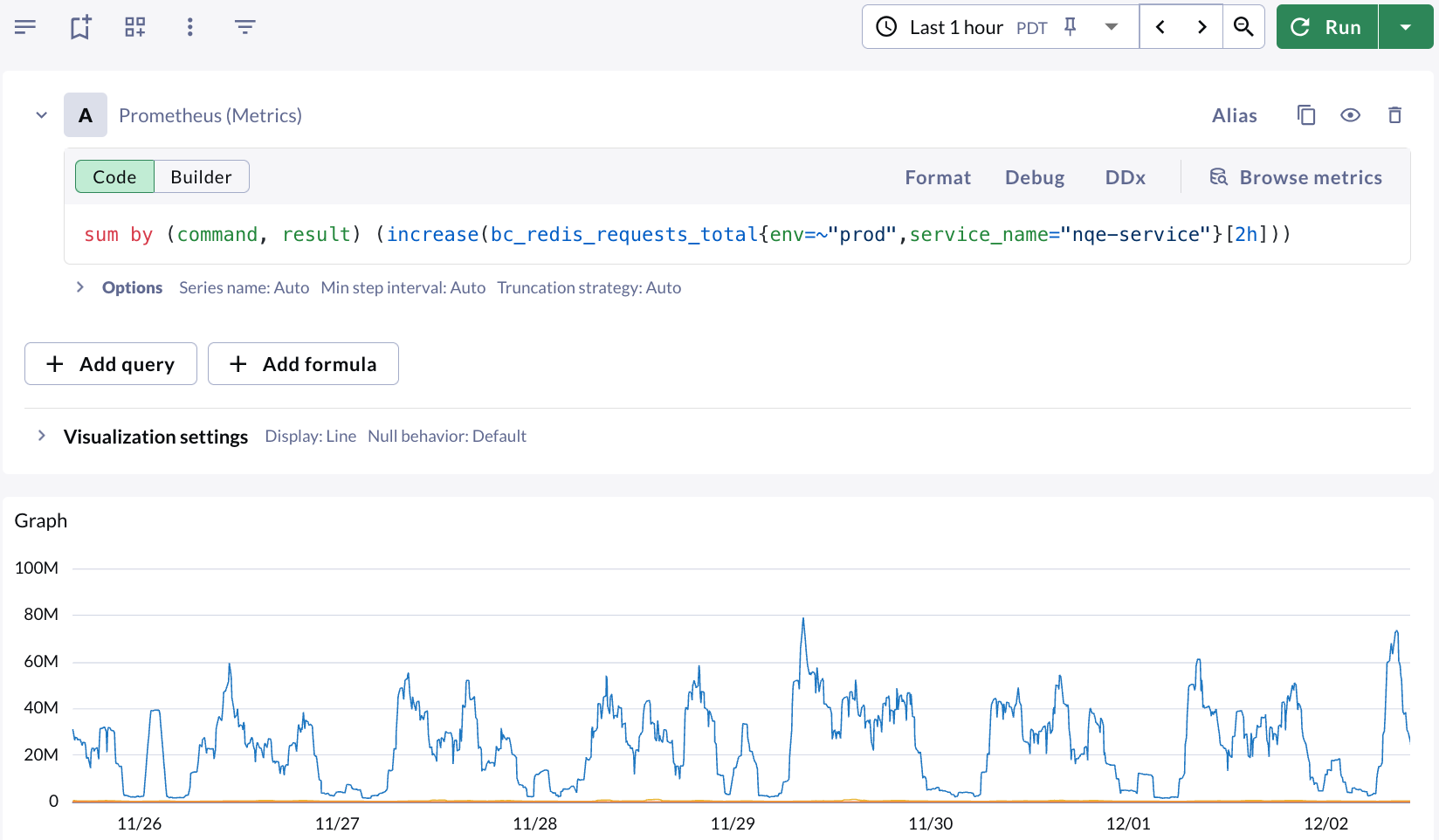
### Differences in interval
If there are differences in the data being displayed in panels between Datadog and
Chronosphere, review the time windows being used to see if they're different. Datadog
can default to displaying a 30 minute time window for deltas, while Chronosphere
defaults to 10 minutes. Adjust the query to use the same time window and `min` step
interval to validate the data. The following images show examples of these
differences:
Datadog displaying 2-hour deltas for the past 7 days:
 Observability Platform displaying 10-min counter increases for the past 7 days (values are smaller):
 Same metric with a 2-hour counter increase for the past 7 days:
### Set the Min step
Prometheus, like Datadog, defaults to using a step size which is a function of the
user interface's window size and query time window. Although you might want a line
chart showing trends over time, a bar chart using sum the of values in the chart
displays values higher than the actual values. Chronosphere recommends
[setting the `Min step` option](/investigate/querying/metrics/explorer#define-a-querys-minimum-step-period)
equal to the interval used in the query.
In dashboards, you can use the `$interval` variable in both places.
### Handle label mismatch in division using `group_left` and `ignoring`
Vector matching will fail when doing arithmetic on time series with different label
sets. In this example, division fails when grouping by `label_A` and `label_B` in the
numerator, but only `label_A` in the denominator.
```text theme={null}
sum by (label_A, label_B) (metric) / sum by (label_A) (other_metric)
```
The pattern to correctly write this query is as follows:
```text theme={null}
sum by (label_A, label_B) (metric) / ignoring(label_A) group_left() sum by (label_A) (other_metric)
```
### Sum multiple sparse Series
Unlike Datadog, PromQL doesn't have behavior to `infer null as 0`. This means when
you try summing together multiple sparse time series, the result will be null if any
individual time series is null. For example, take the following query:
```text theme={null}
sum(requests_succeeded{}) + sum(requests_failed{})
```
If `requests.failed` only ever comes intermittently, the resulting addition would
only produce a value when both `requests.succeeded` and `requests.failed` return
values simultaneously. To solve this problem, Chronosphere recommends concatenating
the metrics together on `__name_`:
```text theme={null}
sum({__name__=~"requests_succeeded|requests_failed"})
```
Following this pattern, Prometheus will essentially merge the time series together.
### Complex Boolean logic in filters
Datadog has support for complex Boolean conditionals in label filters. Take the following query:
```text theme={null}
sum:my.metric{NOT error:404 AND NOT (namespace:foo AND error:503)}
```
A simplistic approach to convert this query would result in
```text theme={null}
sum(my_metric{error!="404", namespace!="my.namespace", error!="503"})
```
However, this is incorrect. Taking a step back, the original Datadog query translates to:
* `NOT error:404`: Select all metrics except those with error:404.
* `AND`: Both conditions need to be satisfied.
* `NOT (namespace:my.namespace AND error:503)`: Select all metrics except those with
`namespace:my.namespace` and `error:503` together.
To correctly convert this query to PromQL while preserving the logic, it should be:
```text theme={null}
sum(my_metric{error!="404"} unless (my_metric{namespace="my.namespace", error="503"}))
```
Because `my_metric{error!="404"}` filters out metrics where error is 404 unless PromQL is used to exclude a subset of the data that matches certain labels from the main set.
`my_metric{namespace="my.namespace", error="503"}` defines the subset to exclude, which is those with `namespace:my.namespace` and `error:503`.
This conversion ensures the correct logical interpretation of the original Datadog query.
Same metric with a 2-hour counter increase for the past 7 days:
### Set the Min step
Prometheus, like Datadog, defaults to using a step size which is a function of the
user interface's window size and query time window. Although you might want a line
chart showing trends over time, a bar chart using sum the of values in the chart
displays values higher than the actual values. Chronosphere recommends
[setting the `Min step` option](/investigate/querying/metrics/explorer#define-a-querys-minimum-step-period)
equal to the interval used in the query.
In dashboards, you can use the `$interval` variable in both places.
### Handle label mismatch in division using `group_left` and `ignoring`
Vector matching will fail when doing arithmetic on time series with different label
sets. In this example, division fails when grouping by `label_A` and `label_B` in the
numerator, but only `label_A` in the denominator.
```text theme={null}
sum by (label_A, label_B) (metric) / sum by (label_A) (other_metric)
```
The pattern to correctly write this query is as follows:
```text theme={null}
sum by (label_A, label_B) (metric) / ignoring(label_A) group_left() sum by (label_A) (other_metric)
```
### Sum multiple sparse Series
Unlike Datadog, PromQL doesn't have behavior to `infer null as 0`. This means when
you try summing together multiple sparse time series, the result will be null if any
individual time series is null. For example, take the following query:
```text theme={null}
sum(requests_succeeded{}) + sum(requests_failed{})
```
If `requests.failed` only ever comes intermittently, the resulting addition would
only produce a value when both `requests.succeeded` and `requests.failed` return
values simultaneously. To solve this problem, Chronosphere recommends concatenating
the metrics together on `__name_`:
```text theme={null}
sum({__name__=~"requests_succeeded|requests_failed"})
```
Following this pattern, Prometheus will essentially merge the time series together.
### Complex Boolean logic in filters
Datadog has support for complex Boolean conditionals in label filters. Take the following query:
```text theme={null}
sum:my.metric{NOT error:404 AND NOT (namespace:foo AND error:503)}
```
A simplistic approach to convert this query would result in
```text theme={null}
sum(my_metric{error!="404", namespace!="my.namespace", error!="503"})
```
However, this is incorrect. Taking a step back, the original Datadog query translates to:
* `NOT error:404`: Select all metrics except those with error:404.
* `AND`: Both conditions need to be satisfied.
* `NOT (namespace:my.namespace AND error:503)`: Select all metrics except those with
`namespace:my.namespace` and `error:503` together.
To correctly convert this query to PromQL while preserving the logic, it should be:
```text theme={null}
sum(my_metric{error!="404"} unless (my_metric{namespace="my.namespace", error="503"}))
```
Because `my_metric{error!="404"}` filters out metrics where error is 404 unless PromQL is used to exclude a subset of the data that matches certain labels from the main set.
`my_metric{namespace="my.namespace", error="503"}` defines the subset to exclude, which is those with `namespace:my.namespace` and `error:503`.
This conversion ensures the correct logical interpretation of the original Datadog query.